


FOREO For You
4.6591.00 Reviews
App Specs
- Version
- 4.4.1
- Updated On
- License
- Free
- Downloads
- 1,000,000+
- Developer
- FOREO
- Categories
- Beauty
- Platform
- Android, iOS
Screenshots
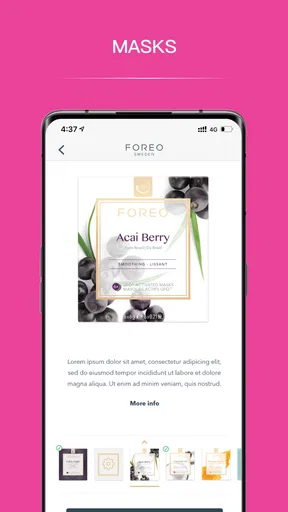
 Analysis by AppCompare
In a shared home, a skincare app can be useful in a quieter way than its feature list suggests: it can help each person remember their own routine without turning the bathroom counter into a guessing game. I find FOREO For You most appealing when one person wants guidance for a personal device and another simply wants a more organized approach to skincare. The key is treating it as an individual companion, not assuming that everyone in the household should use one profile or follow the same steps.
One bathroom, different routines
A realistic example is a household where one person uses a FOREO device regularly while someone else is still learning what routine suits them. The app’s guided treatments can make the device owner’s steps easier to follow, while its personalization can help keep that routine from becoming a one-size-fits-all checklist. I would keep each person’s products and device use distinct rather than treating a shared phone as proof that the routines are interchangeable.
This is where the app differs from a basic skincare notes app or a general habit tracker. Those alternatives can record reminders or products, but they do not have the same device-oriented role. On the other hand, a paper routine or a simple reminder may be enough if all you need is a prompt to wash your face. The app earns its place when its guidance and connection to a FOREO device are part of what you actually use.
Set boundaries before sharing a phone
If family members take turns using one phone, decide whose account is signed in and whose routine is being followed before starting a treatment. I would avoid leaving a device session open for the next person to assume it applies to them. Personalization is only helpful when the person using it recognizes that the instructions are intended for their own routine.
A useful habit is to make the handoff explicit: finish your own session, put the device away, and let the next person open the app for their turn. This is a practical boundary rather than a claim about a special household mode. It reduces mix-ups around whose routine is being tracked and avoids treating another person’s settings or history as a shared record.
Coordination without turning skincare into a chore
For couples or housemates, the app can support coordination without requiring a group skincare plan. One person might use guided treatments while the other keeps to a simple routine; there is no need to match schedules or copy each other’s preferences. I’d use the app to make an individual routine easier to repeat, not as a scoreboard for comparing skin or progress.
That distinction matters because progress tracking can be motivating, but visible changes in skin are not a tidy daily measure. A log is more useful for noticing whether you have been consistent than for judging whether a product or treatment has “worked” after a short stretch. If you are changing several parts of your routine at once, the record may not tell you which change made the difference. Adjusting one thing at a time gives you a more sensible way to interpret what you notice.
Worth Reading Before You Choose

Flipboard Shows What News Apps Must Do Beyond the Feed

Switching to Android Auto Means Rethinking Your Driving Routine

Google Calendar Makes a Crowded Week Easier to Manage

Ludo King Makes the Most of the Minutes Between Plans

Baby Panda World Brings Quick Play to Modern Phones, but Its Game Library Feels Busy

ESPN’s Live Game View Makes Following Close Games Easier
Age, trust, and realistic expectations
The app is rated for Everyone, but that broad age label is not a substitute for an adult’s judgment about skincare products, device use, or personal account access. If a younger household member wants to try it, I would help them understand which routine and device are theirs to use, and make sure an adult is comfortable with the products involved. A general rating does not mean every treatment is automatically suitable for every person.
FOREO For You is free, which makes it easy to explore without paying for the app itself. FOREO is the developer, and the app has an average rating of 4.7 from around 11,000 ratings, with over 1 million installs. Those figures suggest that many people have tried it, but they do not tell me whether it suits a particular household; the practical question is still whether you own a compatible FOREO device and will use the guidance.
First Impressions and Setup
Downloading FOREO For You is as simple as pie. Available on both Android and iOS, it’s just a quick tap away in the App Store or Google Play. Once you’ve got it installed, the interface is clean and intuitive, which is a huge plus if you’re not too tech-savvy.
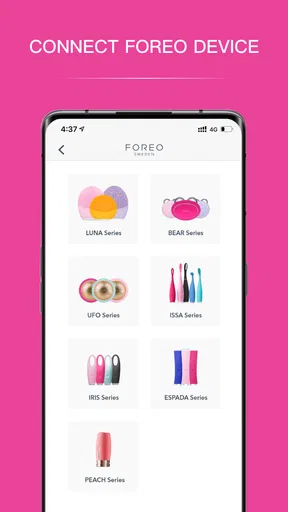
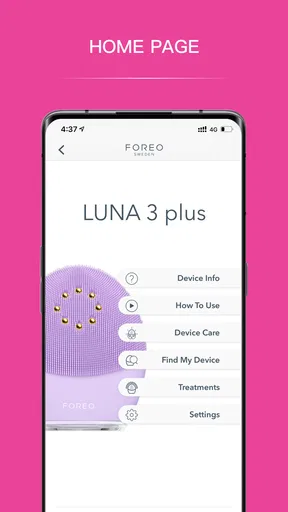
The setup is straightforward. You create an account, and the app walks you through connecting your FOREO device, if you have one. The Bluetooth connection is seamless, and the app recognizes your device almost instantly. No more fiddling around trying to get things to sync!
Features that Stand Out
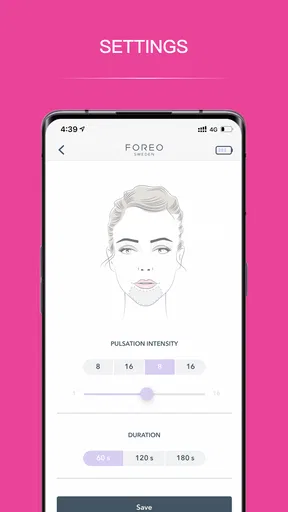
Now, let’s dive into the good stuff. The app is packed with features designed to enhance your skincare routine. One of my favorites is the customization option. You can personalize your cleansing routine based on your skin type and concerns. It’s like having a personal skincare consultant in your pocket.
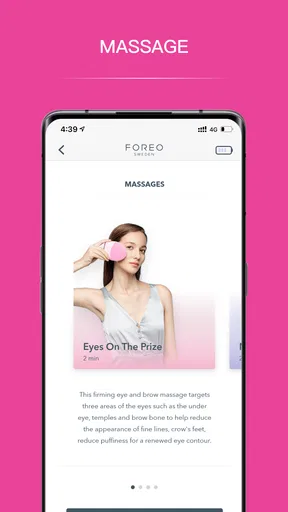
Another cool feature is the guided treatments. You get step-by-step instructions and tips to make sure you’re using your FOREO device effectively. This is especially useful for newbies who might not be confident about their technique.
And then there’s the progress tracking. The app keeps a log of your routines and progress, so you can see how your skin is improving over time. It’s a great motivator to stick with your regimen.
Community and Support
A surprising aspect of the app is its strong community vibe. You can connect with other users, share tips, and even join challenges. It's like having a support group cheering you on as you work towards healthier skin.
If you ever run into any issues, the app’s customer support is just a tap away. They’ve got a solid FAQ section, but if that doesn’t cut it, their customer service team is responsive and helpful.
Things to Keep in Mind
While FOREO For You is packed with features, it’s worth noting that some of them are best utilized if you own a FOREO device. The app does offer value on its own, but for the full experience, having a device is recommended.
Also, for those who are overly concerned about privacy, remember that the app does collect some personal data like any other health app. Always a good idea to review the privacy policy before diving in.
The Final Verdict
So, would I recommend FOREO For You? Absolutely. It’s a fantastic app for anyone looking to up their skincare game. Whether you’re a skincare novice or a seasoned pro, this app offers valuable tools and insights to help you achieve your skin goals.
Overall, FOREO For You makes the skincare routine feel less like a chore and more like a personalized wellness experience. Whether you’re using it to connect your device or just to track your progress, it’s a handy companion on your journey to better skin.
If you’re ready to give it a whirl, you can find it on the App Store or Google Play. Happy cleansing!
Where the app fits—and where it does not
I would choose this app if I wanted my FOREO device and my routine to feel connected: the instructions can take some of the uncertainty out of a first session, and the log can help me build a repeatable habit. It is also a sensible fit for someone who likes prompts and prefers an app-led routine to remembering every step unaided. At the time of writing, its current version is 4.3.5, and it supports devices running Android 7.0 or later.
I would skip it if I wanted a device-neutral beauty planner, a shared household diary, or a clinical way to assess skin changes. A simple notes app is more flexible for recording any brand of product, while a routine tracker may be enough if reminders are the only thing missing. This app’s strongest reason to stay installed is its relationship with FOREO treatments, not a promise to replace professional advice or determine what is happening with your skin.
Make the guidance work for you
One practical tip is to use the guided steps when learning a treatment, then pay attention to what you can realistically repeat. A routine that fits your morning or evening is more useful than an elaborate plan you abandon. I would also treat the app’s tracking as a consistency aid: note meaningful routine changes, but avoid reading too much into a single entry or expecting an immediate visible result.
Another trade-off is that personalization can feel reassuring while still depending on your own judgment. Skin concerns do not always fit neatly into a preset, and an app cannot replace a clinician when irritation or a persistent problem needs attention. If a treatment feels uncomfortable, I would stop and reassess rather than pushing through because a guided sequence says what comes next.
What to expect before installing
The app is free, and its content rating is Everyone. It was released on April 10, 2018, and has accumulated around 588 written reviews alongside its ratings. I would still approach community tips as personal experiences rather than instructions tailored to my skin: what works for another user may not suit me, particularly when products and routines differ.
People often wonder whether they need a FOREO device to get value from the app. I see the device as central to the fuller experience because the setup and guided treatments are built around using one, while routine tracking can still be useful for someone who wants a little structure. If you mainly want product recommendations across many brands, a dedicated beauty journal is likely a better match.
For a household, my recommendation is simple: let each person keep responsibility for their own routine, and use the app when its guidance genuinely helps that person. It is not a substitute for clear boundaries around shared devices, accounts, or products, but it can make a personal treatment less confusing and easier to repeat. The strongest reason to try it is a real interest in FOREO’s connected skincare approach; without that, a lighter-weight tracker may suit you better.
Pros
- User-friendly interface with easy navigation.
- Wide range of skincare routines available.
- Personalized routines based on skin type.
- Real-time feedback during use.
- Compatible with multiple FOREO devices.
Cons
- Limited features without in-app purchases.
- Requires Bluetooth for full functionality.
- Some routines need a stable internet connection.
- Device syncing can occasionally be slow.
- Lack of detailed tutorials for beginners.
FAQs for FOREO For You
What is the main purpose of the FOREO For You app?
The FOREO For You app is designed to enhance your skincare routine by connecting with FOREO devices. It provides personalized skincare tips, guides on using your FOREO device effectively, and tracks your skin’s progress. The app ensures you get the most out of your FOREO products by offering tailored advice and features.
How do I connect my FOREO device to the app?
Connecting your FOREO device to the app is simple. Ensure Bluetooth is enabled on your phone, then open the app and follow the on-screen instructions to pair your device. Once connected, you can access all app features, including personalized routines and progress tracking, ensuring a comprehensive skincare experience.
Is the FOREO For You app free to use?
Yes, the FOREO For You app is completely free to download and use. It does not include any in-app purchases or subscriptions, making all its features accessible to users who own a compatible FOREO device. This includes customization options, skincare tracking, and expert skincare tips.
What devices are supported by the FOREO For You app?
The FOREO For You app supports a range of FOREO devices, including the Luna, UFO, and Bear series. It's essential to check the specific compatibility of your device on the app description or FOREO’s official website to ensure full functionality and access to all available features.
Does the app require an internet connection to function?
While the FOREO For You app requires an internet connection for initial setup and updates, many features can be used offline once your device is paired. This includes basic device controls and saved skincare routines, allowing flexibility in use regardless of internet availability.


